Skip to content
Every business, a different appCase study · showcase project

Booking portal for an equipment rental

A rental with 48 machines ran its bookings on the phone and a paper diary — and half the enquiries came in when nobody was picking up. We built a portal where the customer books a machine online like a hotel, and the depot sees occupancy, deposits and inspections on one screen.

Industry
Construction equipment rental
Type
Booking portal + depot + mobile
Scope
6 modules + customer mobile
Project
from CZK 220,000
Delivery
6–8 weeks

The starting point

A rental with 48 machines — mini excavators, lifts, plates, breakers — ran on what most rentals run on: a phone and a paper diary on the counter. Whether a machine was free was known only to whoever was holding the diary. Now and then one excavator got promised twice, other times it sat idle for a week because nobody knew about it. And almost every dispute at return began with “that scratch was already there”.

The owner didn't want a “warehouse system”. He wanted the customer to book a machine themselves from the site — like a room on Booking.com — and the depot to stop playing phone ping-pong. The rest grew out of a morning spent behind the pickup counter.

What hurt the most

  • 01Bookings by phone only — “call and ask if it's free”
  • 02The occupancy calendar lived in one person's head — double bookings
  • 03Machines sat idle even while sought elsewhere
  • 04Statutory lift inspections tracked from memory — risk of a lapsed one
  • 05Return disputes with no proof: “that damage was already there”
  • 06Half the enquiries arrived after hours — and fell through the cracks

Walk through the portal screen by screen

Every screen is from an actually built showcase application — clickable UI with fictional data, not a static mockup.

rezervace.vase-pujcovna.cz/stroje
Booking portal for an equipment rental — Equipment catalogue
24/7catalogue with live availability
01

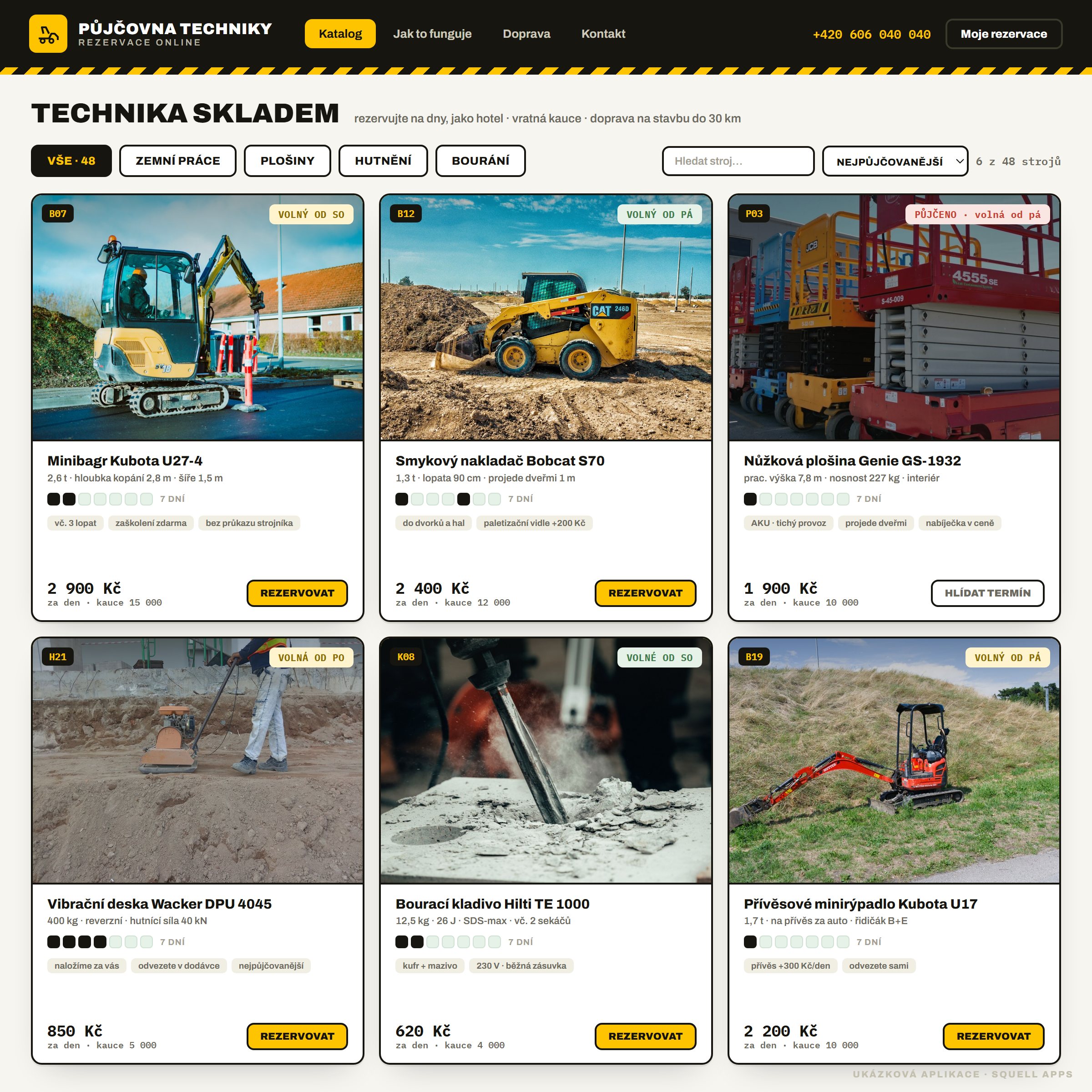
Equipment catalogue

The customer's entry screen. It looks like an online shop, but instead of a cart it shows availability: each machine has a seven-day bar that tells you at a glance when it's free. You filter by category, search by name and sort by price — and a machine can be booked 24 hours a day.

What's here

  • Machine tiles with day rate, deposit and a photo of real equipment
  • A 7-day availability bar — free vs. booked at a glance
  • Category filters: earthworks, lifts, compaction, demolition
  • Live search by name and sorting by price
  • Machine tags: “no operator licence needed”, “training free”
  • A booked machine offers “watch this date” instead of a dead end

Why the client wanted it

The owner put it simply: “I want a guy on site at seven in the evening to see for himself what's free and click.” A catalogue with live availability killed the first half of the calls — the ones that started with “got a free excavator?”.
rezervace.vase-pujcovna.cz/stroje/b07-minibagr
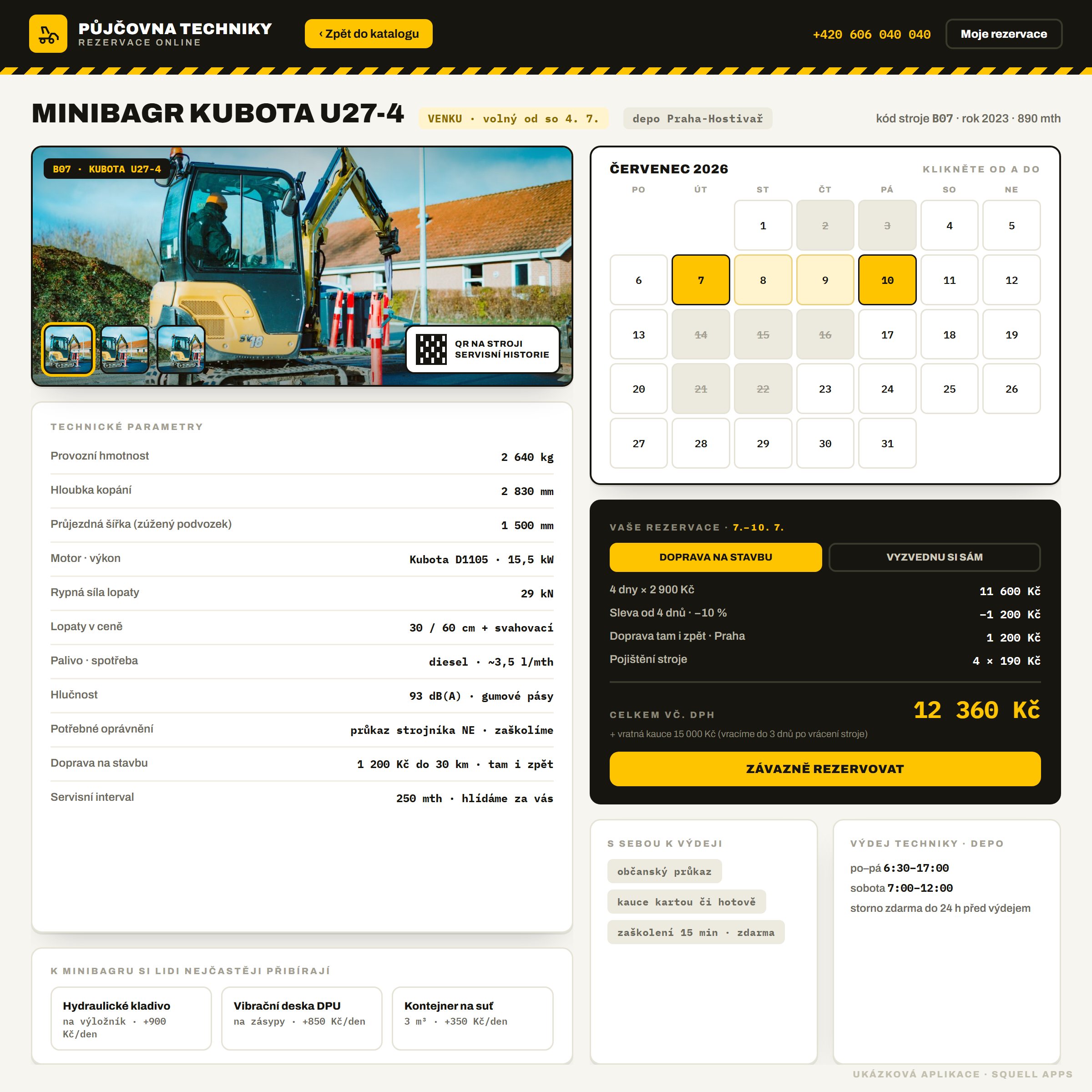
Booking portal for an equipment rental — Machine detail and booking
60 sa booking with price and delivery
02

Machine detail and booking

The heart of the booking. Photo gallery and specs on the left, a calendar on the right — the customer clicks the FROM and TO day, booked days are struck through and can't be picked. The price is computed live: days × rate, discount from four days, delivery or self-collect, insurance and a refundable deposit. No “we'll get back to you with a price”.

What's here

  • Machine photo gallery and full technical specs
  • FROM–TO calendar picker, booked days can't be selected
  • Live pricing: rate, discount from 4 days, delivery, insurance
  • Toggle “delivery to site” vs. “I'll collect it myself”
  • Refundable deposit and what to bring, right by the price
  • Add-ons for the machine — breaker, plate, skip — in one click

Why the client wanted it

Quoting a rental over the phone is imprecise and slows both sides down. When the portal computes the price itself, including delivery and deposit, the customer books right away — and the rental stops burning time on calculators at the phone.

depo.vase-pujcovna.cz/obsazenost
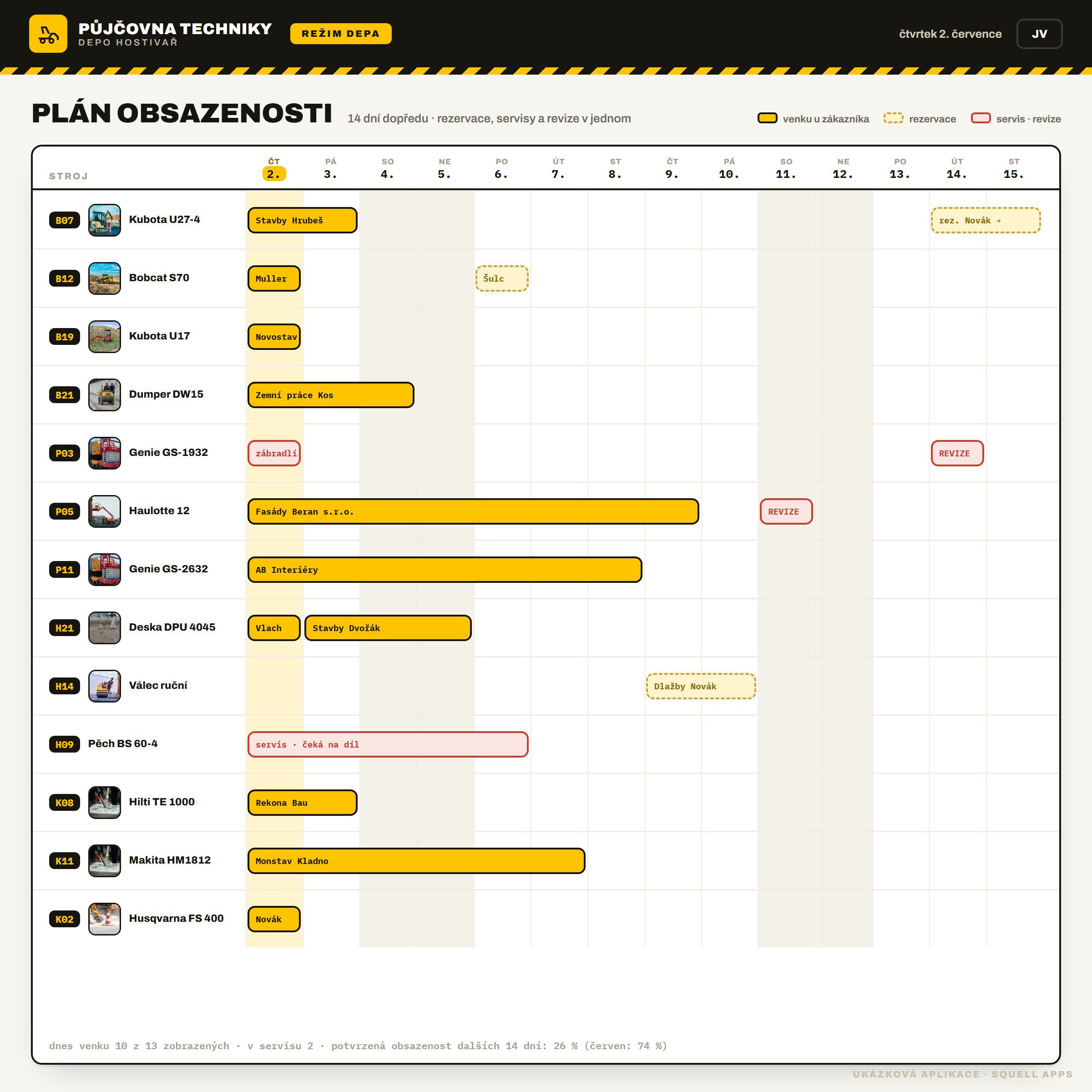
Booking portal for an equipment rental — Occupancy plan
0double bookings since launch
03

Occupancy plan

What used to live in a paper diary and in someone's head is now held by the system. A Gantt plan shows all 48 machines 14 days ahead: yellow for machines out with a customer, dashed for upcoming bookings, red for service and inspections. A double booking simply can't be created — the taken slot is visible.

What's here

  • A 14-day timeline — one row per machine
  • Status colours: out with a customer · booking · service and inspection
  • Weekends dimmed, today highlighted — the eye knows where it is
  • Statutory lift inspections as fixed blocks you can't miss
  • Occupancy for the next 14 days and comparison with last month
  • A free window at a glance — capacity for add-on bookings

Why the client wanted it

A rental's costliest mistake is promising one machine twice — or leaving it idle when it was sought elsewhere. The occupancy plan kills both: capacity is visible in full, and bookings never overlap.

depo.vase-pujcovna.cz/pohyby
Booking portal for an equipment rental — Daily depot movements
CZK 184,000held deposits — always traceable
04

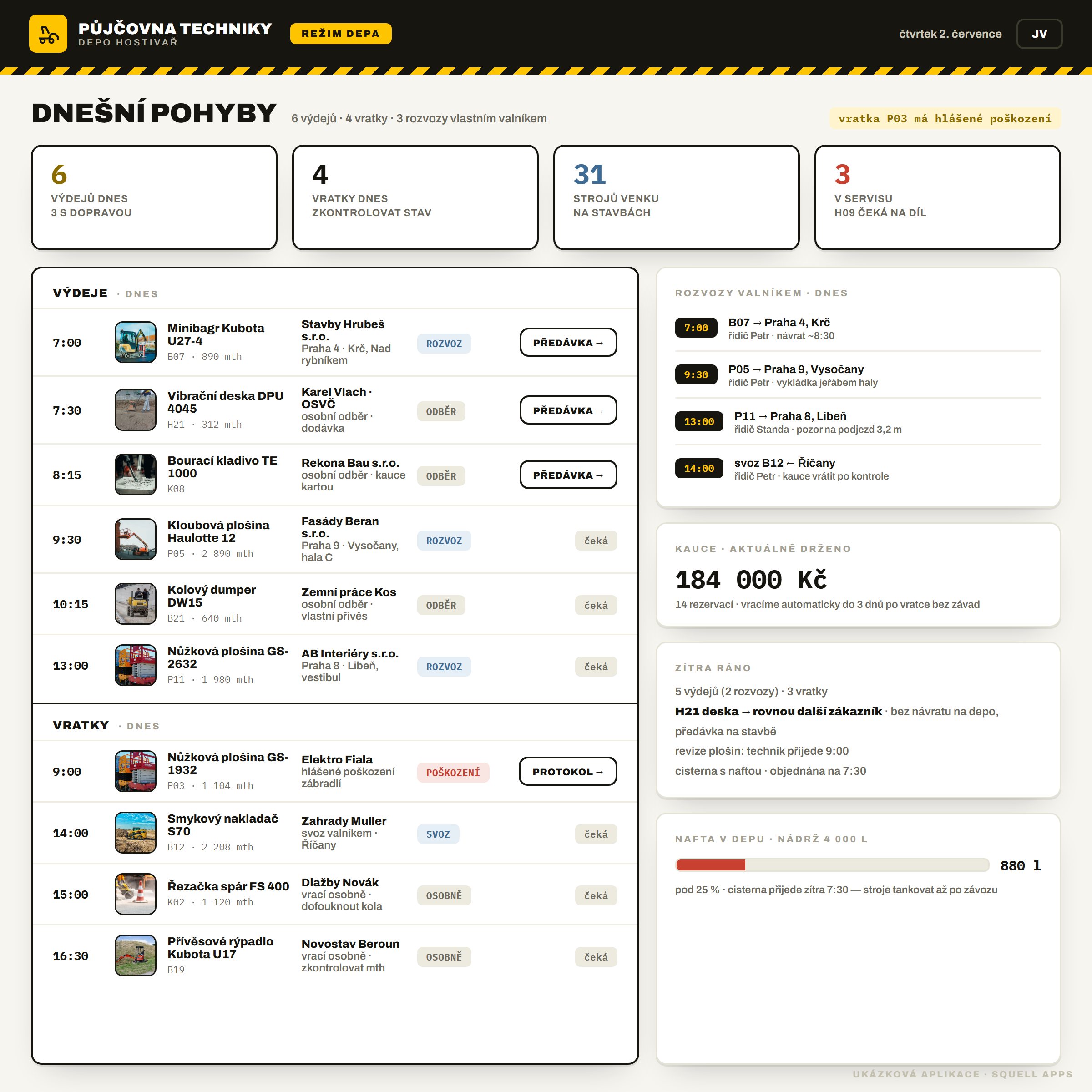
Daily depot movements

The operations screen for the pickup counter. In the morning the depot knows in thirty seconds what's moving today: pickups and returns by time, which go on the company flatbed and which the customer collects, how much deposit is held and what needs prepping for tomorrow. A return with reported damage lights up red.

What's here

  • Today's pickups and returns sorted by time
  • Flatbed deliveries with driver and site address
  • Held deposits in one figure — and when they're returned
  • A damaged return highlighted — leads straight to the protocol
  • Tomorrow's prep: machines straight to the next site, no return trip
  • Diesel level in the depot and the ordered tanker

Why the client wanted it

The pickup counter is a rental's busiest spot. When staff have today's movements, deposits and tomorrow on one screen, they don't hand over a machine with paper in one hand and a phone in the other — and nothing slips.

depo.vase-pujcovna.cz/predavka/2214
Booking portal for an equipment rental — Handover protocol
0“it was already there” disputes
05

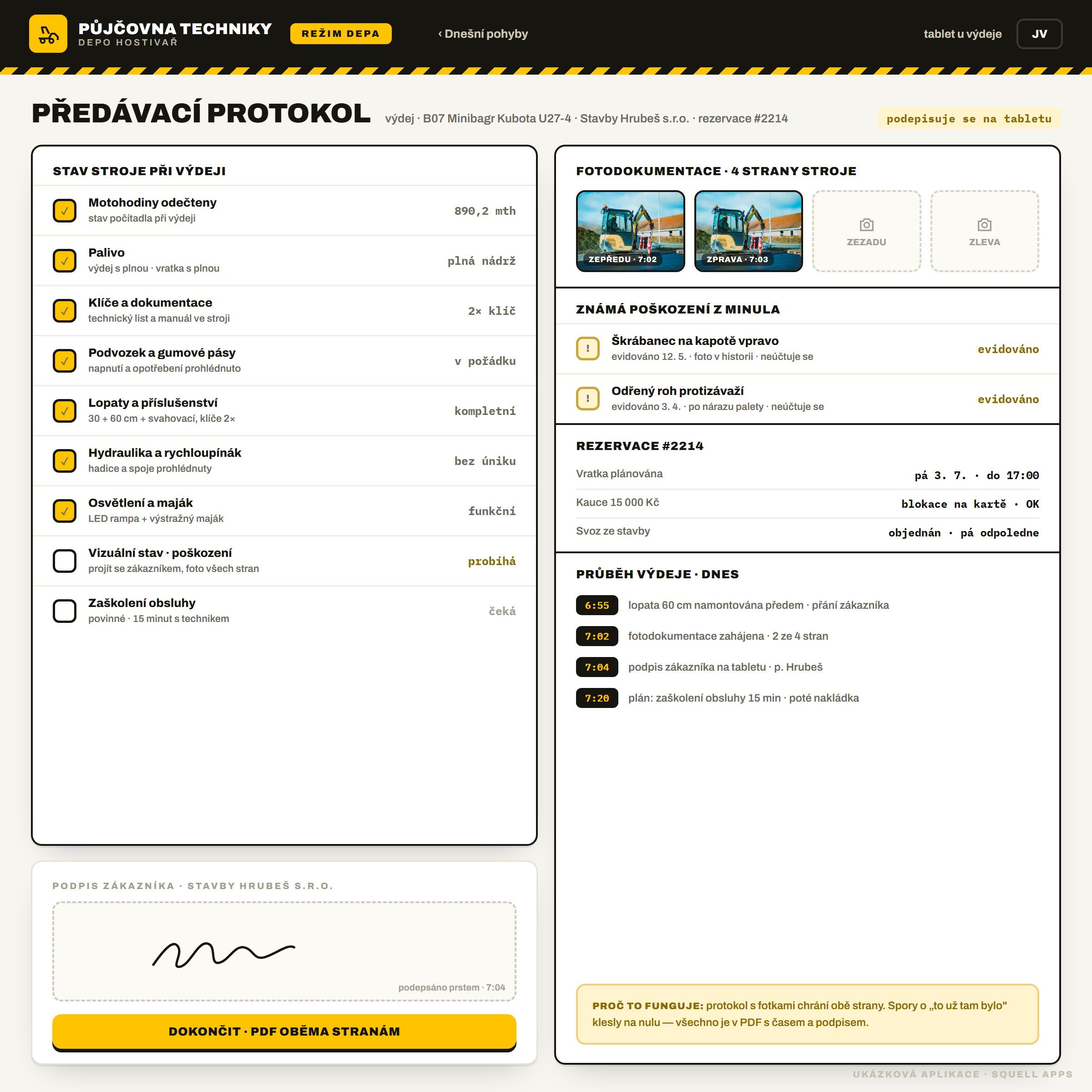
Handover protocol

The end of “it was already like that” disputes. At pickup the staff tick off the machine's condition, photograph all four sides and the customer signs on a tablet with a finger. Known damage from before is visible and not charged. Everything drops into a PDF with time and signature that both sides receive.

What's here

  • Condition checklist: engine hours, fuel, hydraulics, attachments
  • Four-side photo documentation with a timestamp
  • Known damage from history — logged, not charged
  • Customer signature with a finger on the tablet
  • Handover as a timeline — when each step happened
  • PDF protocol to both sides the moment it's completed

Why the client wanted it

Damage disputes cost the rental money and nerves — without a photo nothing could be proven. A protocol with time and signature brought them to zero: what's in the pickup photo is what counts.

depo.vase-pujcovna.cz/flotila
Booking portal for an equipment rental — Fleet and inspections
0lapsed lift inspections
06

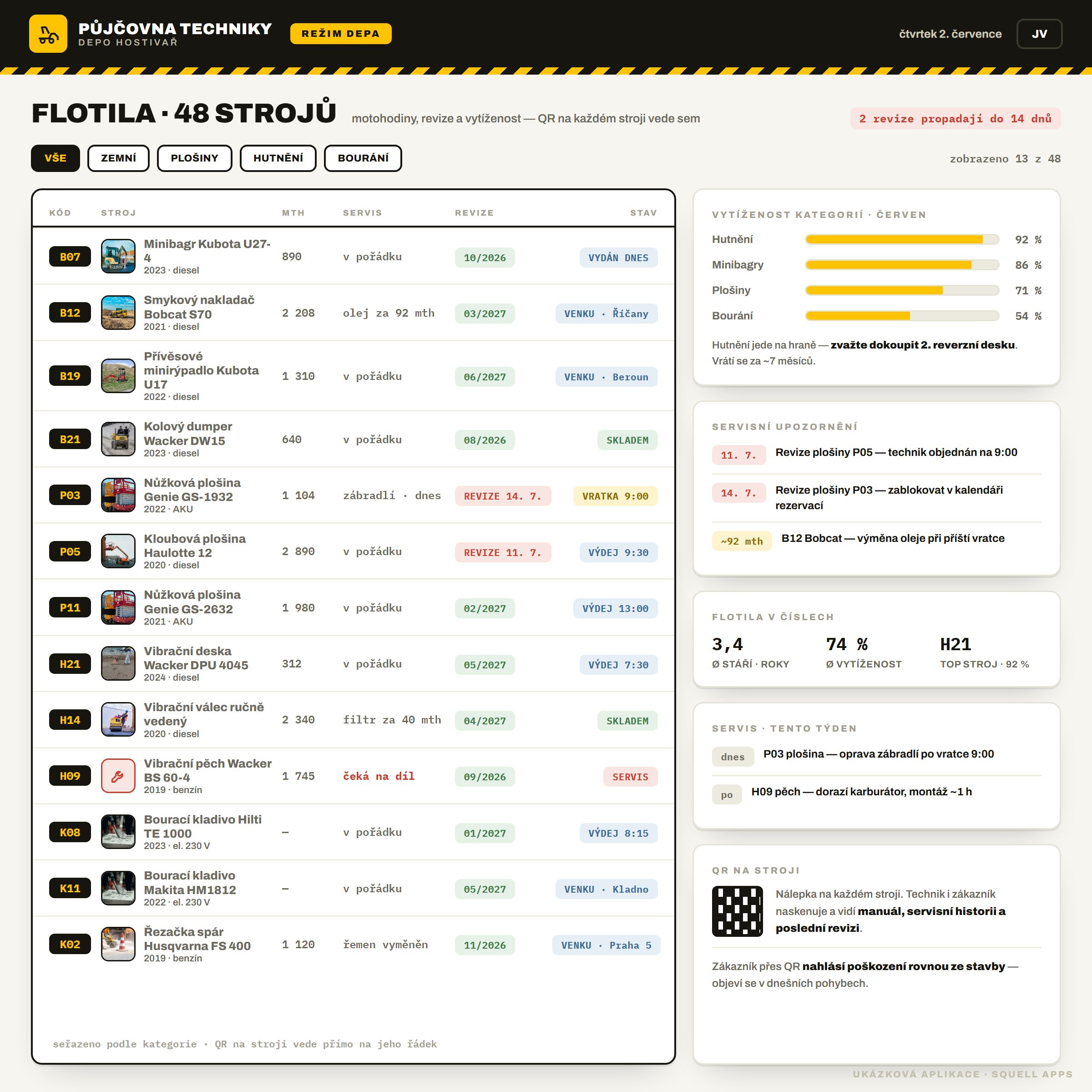
Fleet and inspections

The whole fleet in one place — 48 machines with engine hours, service, inspections and utilisation. The rental tracks statutory lift inspections before they lapse, and sees which category is running at the limit and is worth another unit. Every machine carries a QR code that leads straight to its row.

What's here

  • An overview of 48 machines: engine hours, service, inspection, status
  • Statutory lift inspections tracked ahead — nothing lapses
  • Utilisation by category — where the fleet runs at the limit
  • A buy-more hint when demand exceeds capacity
  • QR on the machine: technician and customer see the manual and history
  • Service alerts sorted by urgency

Why the client wanted it

A lapsed lift inspection means the machine can't go out — and the rental finds out at the worst possible moment. When the system tracks inspections ahead, the technician arrives in time and the machine earns instead of sitting blocked.

What it brought the rental

The figures are illustrative — they show the typical benefit of the portal for a rental of this size.

0

double bookings

common before with the paper diary

+18 %

fleet utilisation

machines sit idle less

54 %

bookings online

previously by phone only

0

damage disputes

a protocol with photos and a signature

Under the hood

The portal is a web application — it runs in the browser on the depot counter and on the customer's phone on site, with no installs. An availability engine tracks bookings and never allows a double booking; payments and refundable deposits go through a payment gateway; extensions are handled by an SMS gateway. Every machine has a QR sticker that leads to its card.

Next.js + ReactPostgreSQLPayment gateway + depositsSMS gatewayMachine QR codesAvailability enginePWA · customer mobileEU hosting · GDPR

How a project like this comes to be

  1. 1

    A day at the counter

    We stand at the pickup counter and map how booking, pickup and return really run — not how they're described in a meeting.

  2. 2

    A clickable design

    Within two weeks you get a clickable application like this one. You decide over finished UI, not wireframes.

  3. 3

    Module-by-module build

    We build in parts — catalogue and occupancy first, because they hurt the most. Each module goes live as soon as it's ready.

  4. 4

    A pilot on part of the fleet

    For two weeks booking runs for real on one machine category. Whatever doesn't fit, we fix before customers see it.

  5. 5

    Live operation and growth

    After launch we don't abandon the system — we gather feedback and deliver further modules.

The rental booking portal is a showcase concept built by our studio: a real, clickable application with fictional data. It shows how we build booking systems to order — yours would be shaped by your operation. Machine photos: Pexels and Unsplash (free licence).

Renting equipment via phone and a paper diary?

We'll show you the portal on one screen. Within two weeks you'll see a clickable design of your booking system — no strings attached.

Write to us